0
%

Time
TIME – Your All-in-One Leave & Attendance App!
Welcome to TIME Works, your central hub for managing employee attendance, leave, and working hours with complete clarity. Designed as a modern SharePoint application, Time Works helps employees, managers, and administrators track swipes, manage leave requests, approve regularisations, and analyse attendance data—all from a single, intelligent dashboard.
From daily swipe-ins to organisation-wide attendance reports, Time Works simplifies workforce operations with automation, transparency, and real-time insights—fully integrated into your Microsoft 365 environment.
Seamless Integration, Superior Control
Time Works is a modern single-page application (SPA) built natively for SharePoint Online and available directly inside Microsoft Teams as a tab.
It leverages SharePoint Lists for secure data storage while providing role-based access for Associates, Managers, and Admins.
No external systems. No fragmented data. Just one reliable source of truth for attendance and leave management.
100% Integrated
Eliminate app-switching
Manage attendance, leave requests, approvals, and reports directly inside SharePoint and Microsoft Teams with real-time data stored securely in SharePoint Lists.
FAST
Rapid Deployment
Get started faster
Deploy quickly using Excel bulk imports or Microsoft user sync, enabling associates to start using TIME with minimal setup and no coding.
Key App Features
TIME Works delivers a complete, SharePoint-native solution for attendance and leave management. Whether you are an employee tracking daily hours, a manager approving requests, or an admin configuring policies, it adapts to your organization’s workflow.
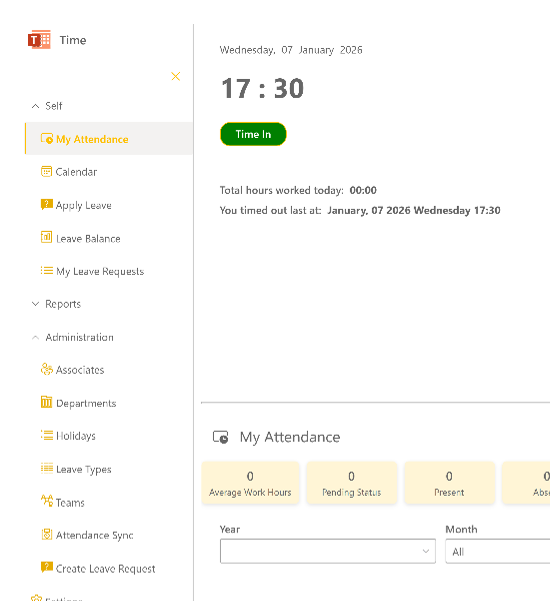
Attendance Regularization with Swiping
Tracking Swipe-In and Swipe-Out Made Easy
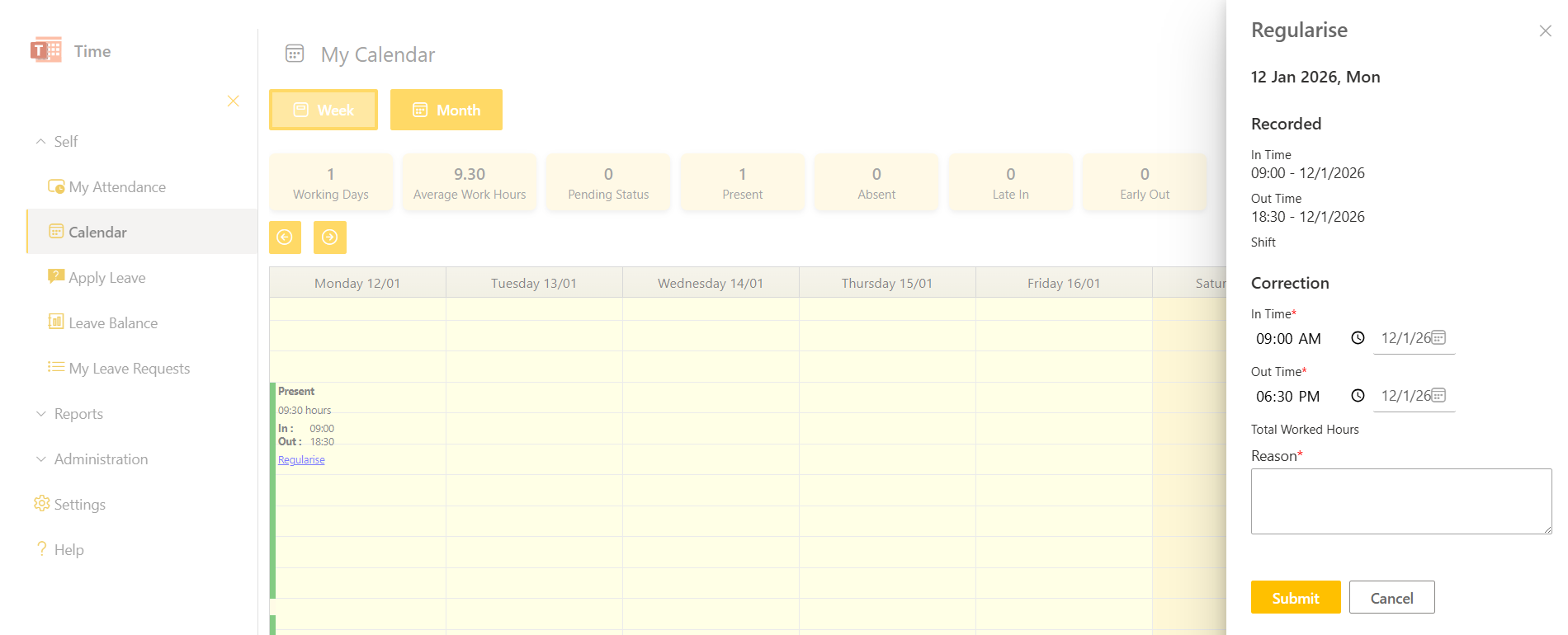
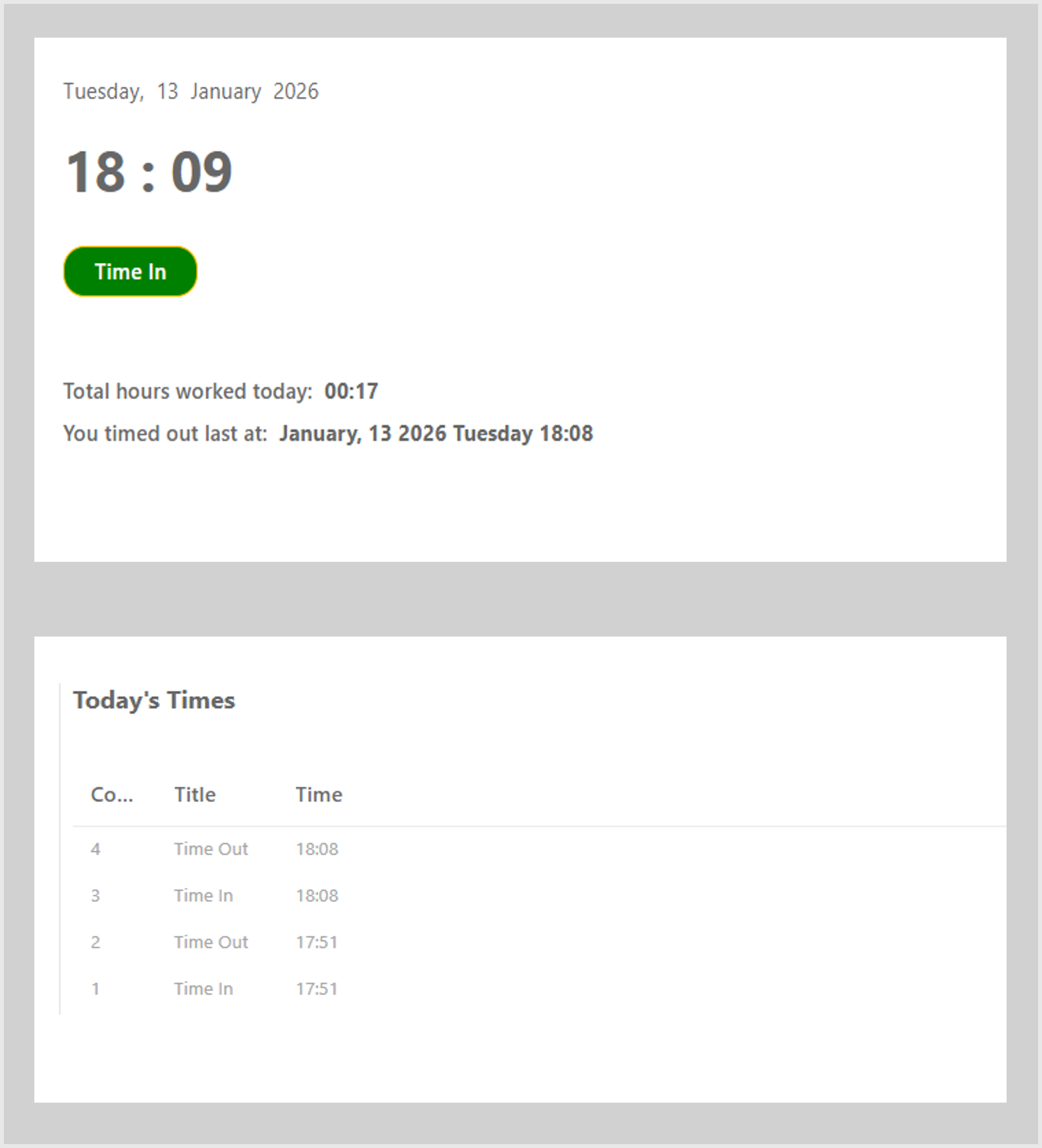
Record daily working hours through Swipe In and Swipe Out actions. Users can swipe multiple times a day, with the first swipe-in and last swipe-out considered for worked hours. Attendance regularisation allows corrections with proper approval, ensuring accurate records.
Employee Self-Service
Leaves and Attendance, Simplified
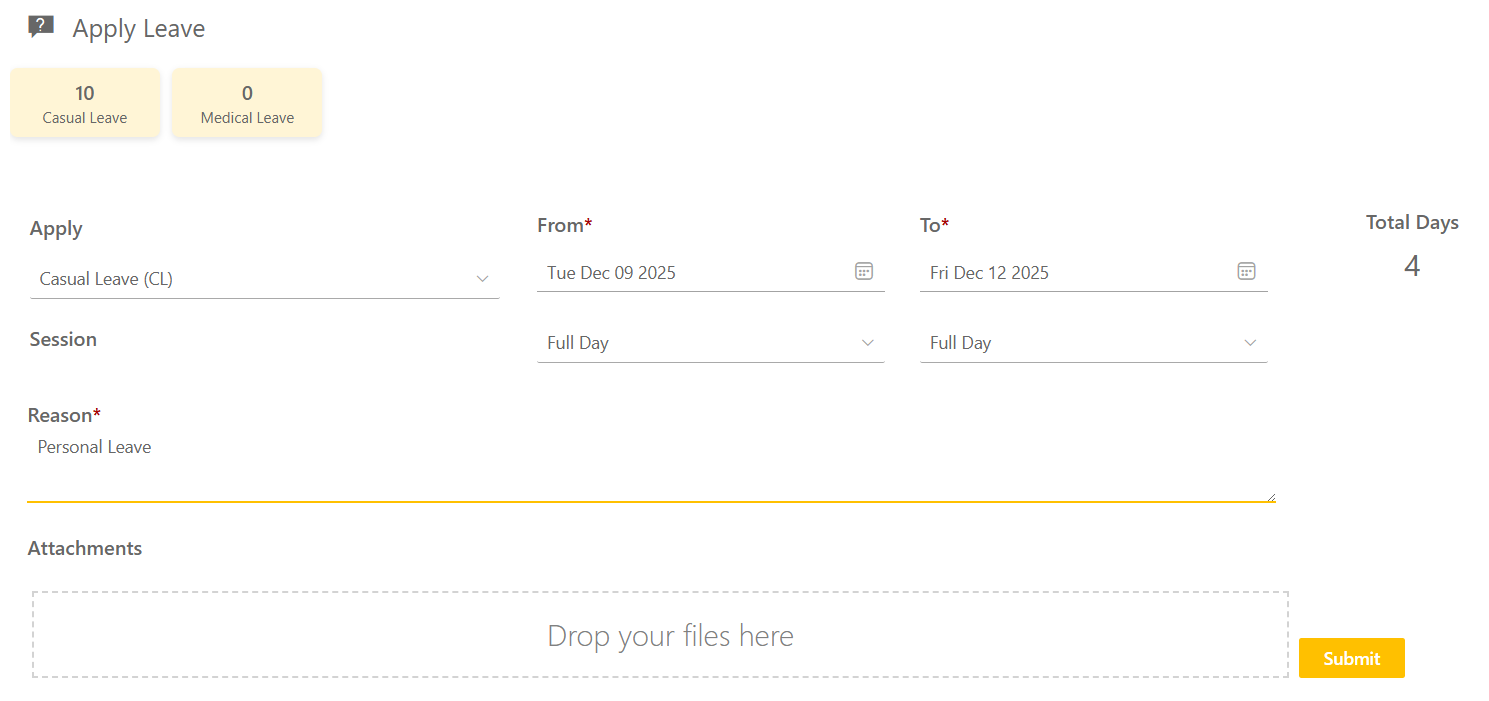
Employees can independently apply for leave, check leave balances, view attendance history, regularise time, and export records to Excel—reducing HR dependency and manual follow-ups.
Streamlined Managerial Workflow
Approvals Made Easier
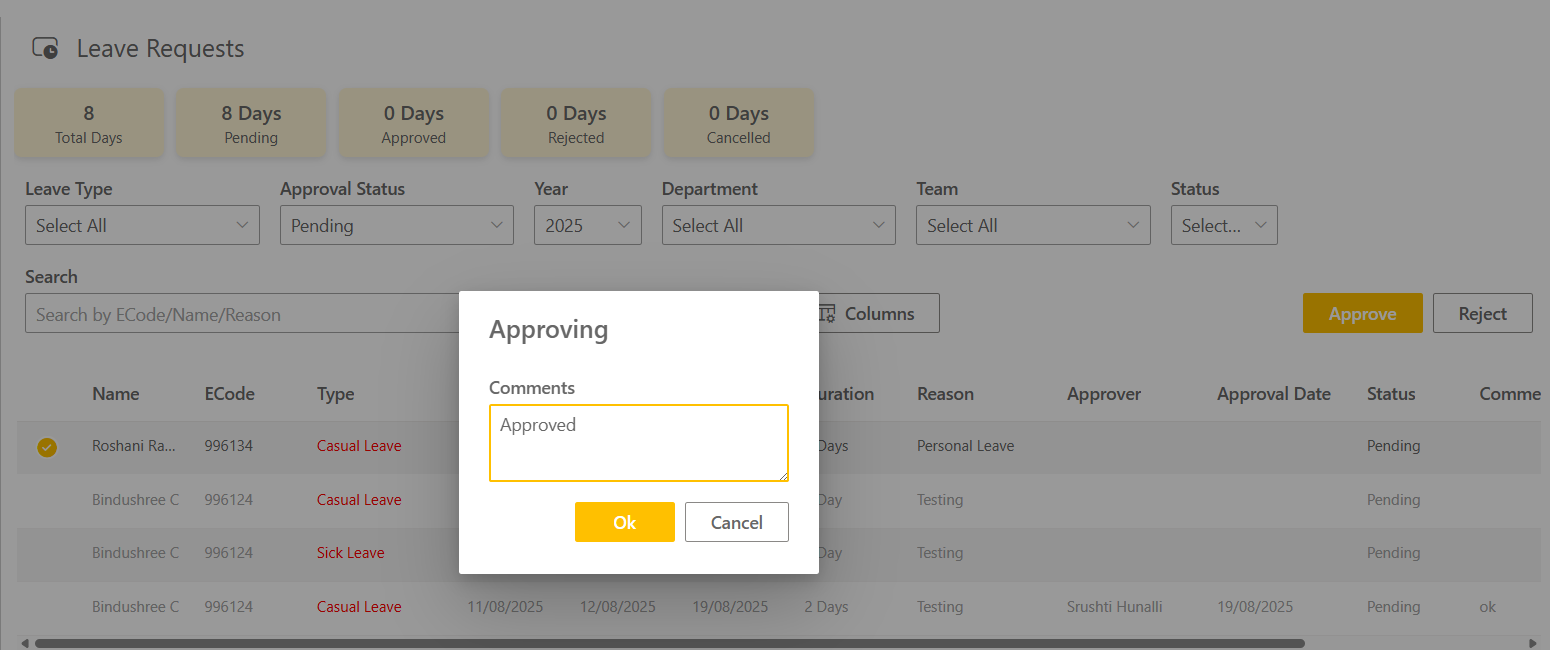
Managers can approve or reject leave requests and attendance regularizations, view team attendance data, access calendars, and export reports—all from a centralized “My Team” view.
Admin Control & Advanced Reporting
Real-Time Visibility Across the Organization
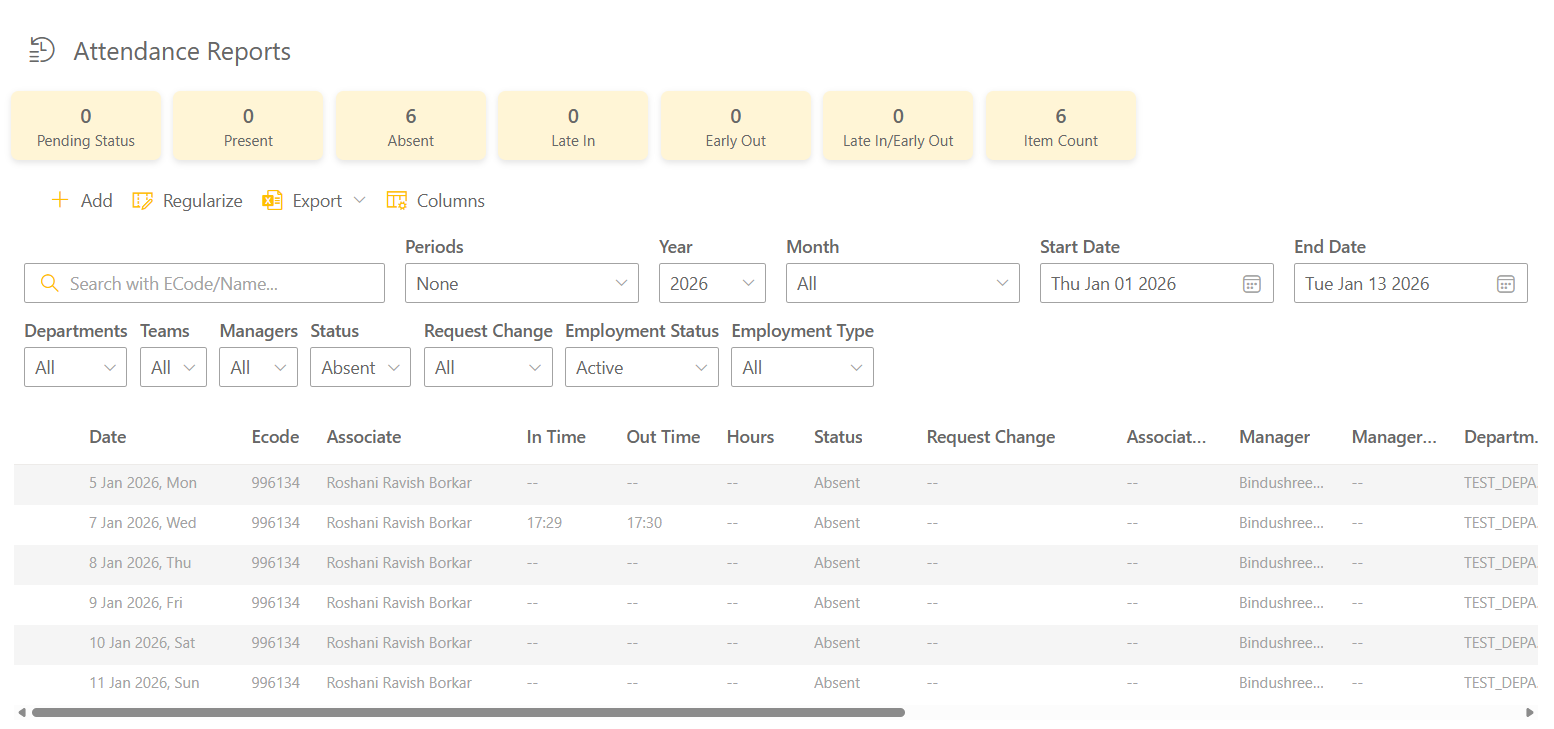
Administrators gain a unified view of attendance and leave data across organization using powerful filters and reports. Analyse trends, monitor compliance, and export structured data for audits and planning.
Configurable Leave Policies
Adapt TIME to Your Business Rules
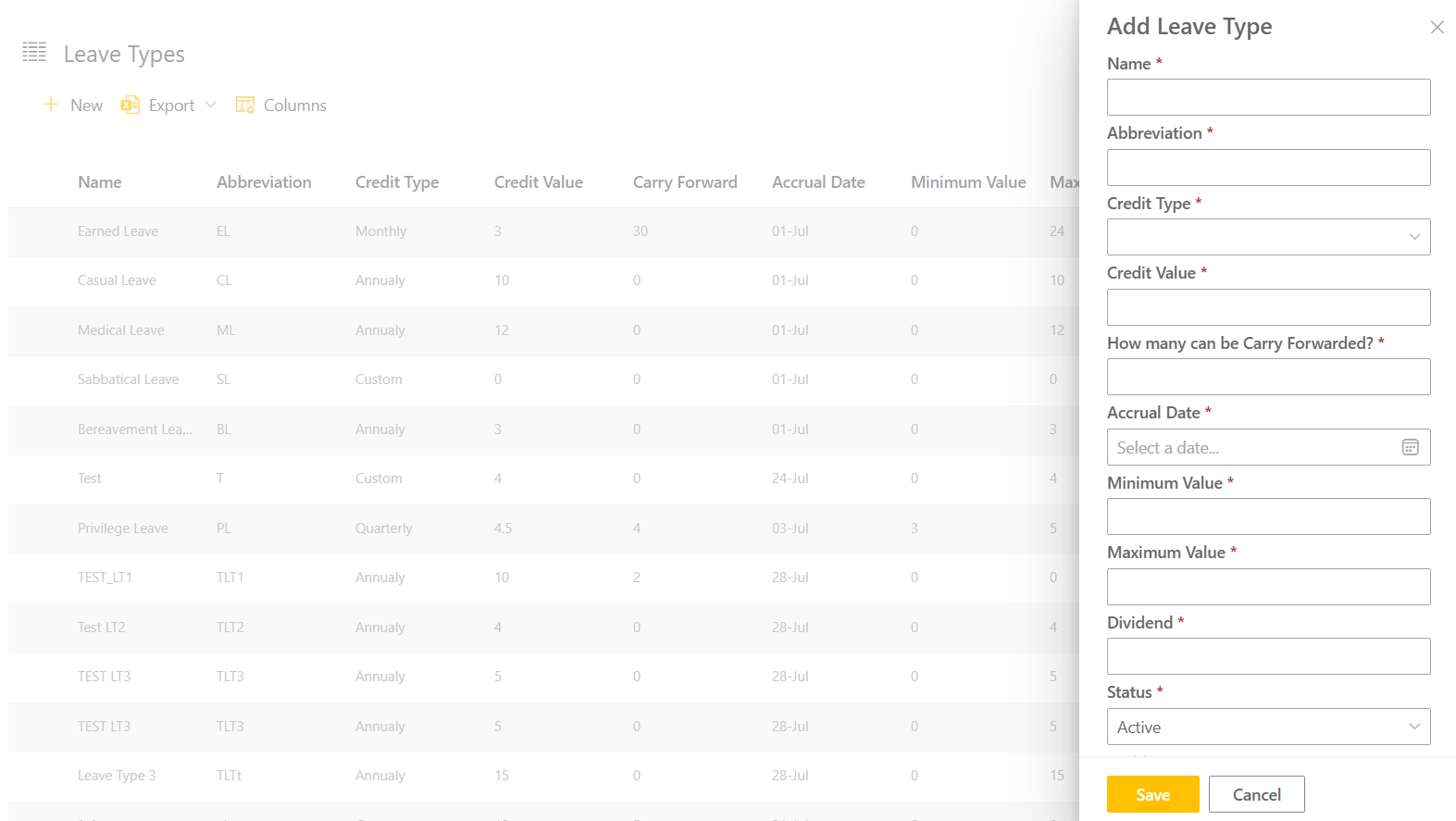
Configure leave types, define company-specific policies, manage holidays, edit leave balances, and control application rules for permanent and contract employees—all without custom development.
Application Overview
Experience a seamless attendance and leave workflow fully embedded in your Microsoft 365 ecosystem. TIME works directly inside SharePoint pages and as a Microsoft Teams tab, keeping your users productive without leaving their daily workspace.
- Self
- My Team
- Reports
- Settings
- Administration
Manage Your Attendance and Leave
View your daily attendance, swipe in and out, apply for leave, regularise working hours, and track leave balances—all from one personal dashboard designed for ease and transparency.
Swipe In / Swipe Out
Record working hours with multiple swipes per day, using first-in and last-out for accurate calculation
Calendar View
Weekly and monthly calendars showing attendance status, holidays, and leaves
Excel Export
Export personal attendance and leave data instantly for reference or reporting
Attendance Regularisation
Request corrections for missed or incorrect swipe timings with manager approval
Leave Management
Apply for leave, track approval status, and monitor available leave balances
Simplify Team Attendance and Leave Approvals
Gain complete visibility into your team’s attendance and leave activities. Approve or reject requests, track team availability, and export reports with ease.
Leave Approvals
Approve or reject leave requests with optional manager comments
Team Attendance View
Monitor attendance records and daily status for all reportees
Export Reports
Download team attendance and leave details in Excel format
Regularisation Approvals
Review and act on attendance regularisation requests from team members
Leave Balance Overview
View leave balances for all team members across leave types
Analyze Attendance and Leave Data with Confidence
Transform attendance and leave records into actionable insights using organization-wide reports designed for accuracy, compliance, and workforce planning.
Attendance Reports
Organization-level attendance data with filters, summaries, and export options
Leave Requests Reports
Track leave requests by status, type, department, or date range
Customizable Columns
Configure visible columns to match reporting needs
Leave Balance Reports
Consolidated view of leave balances across all associates
Bulk Actions
Add, edit, or regularise attendance records in bulk
Configure Policies and System Behavior
Control how TIME Works operates across your organization. Configure leave rules, attendance formats, page layout, and administrative access from one centralized settings panel.
Leave Policy Configuration
Define leave application periods, leave types, and contract employee rules.
Page Settings
Optimize SharePoint page layout for maximum workspace.
System Controls
Manage global configurations to align with company policies.
Attendance Settings
Display worked hours in decimal or HH:MM format.
Admin Management
Add or remove administrators with controlled access.
Centralized Workforce Administration & Control
Configure and manage core organizational data that powers TIME Works. Maintain associates, departments, teams, leave structures, holidays, and attendance synchronization from a single administrative panel.
Associates Management
Add, edit, or bulk import associate records and maintain employee master data.
Leave Types Configuration
Create and manage multiple leave types with company-specific rules and balances.
Attendance Sync
Synchronize attendance data to ensure accurate and up-to-date records.
Departments & Teams
Define organizational structure by configuring departments and team hierarchies.
Holiday Management
Maintain yearly holiday calendars applicable across the organization.
Create Leave on Behalf
Raise leave requests for associates directly from the admin panel, with or without approval flow.
Customise yourself or ask us
100% Native to Office 365, these purpose-built apps gives your team power of seamless collaboration and optimized workflows for smarter task execution – all designed to take your business to next level.
Plans That Fit Your Scale
Lorem ipsum dolor sit amet, consectetur adipiscing elit, sed do eiusmod tempor incididunt ut labore et dolore magna aliqua. Ut enim ad minim veniam
- Monthly
- Yearly
Basic Plan
Get the basic HR support you need keep your small business running smoothly
$0/per month
- Basic reports
- 24/7 email and live chat support
- Active fraud prevention
- Dispute management
- 2 staff accounts
Best Value
Premium Plan
Get the basic HR support you need keep your small business running smoothly
$68/per month
- Professional reports
- 24/7 email and live chat support
- Active fraud prevention
- Dispute management
- 5 staff accounts
Enterprise Plan
Get the basic HR support you need keep your small business running smoothly
$125/per month
- Custom report builder
- 24/7 email and live chat support
- Active fraud prevention
- Dispute management
- 15 staff accounts
Basic Plan
Get the basic HR support you need keep your small business running smoothly
$80/per yearly
- Basic reports
- 24/7 email and live chat support
- Active fraud prevention
- Dispute management
- 2 staff accounts
Best Value
Premium Plan
Get the basic HR support you need keep your small business running smoothly
$112/per yearly
- Professional reports
- 24/7 email and live chat support
- Active fraud prevention
- Dispute management
- 5 staff accounts
Enterprise Plan
Get the basic HR support you need keep your small business running smoothly
$185/per yearly
- Custom report builder
- 24/7 email and live chat support
- Active fraud prevention
- Dispute management
- 15 staff accounts
Ready to Transform Your Business? Take the First Step Today!
Purpose-built tools for real-world engineering
Call Us
+49 821 71717
Email Us
support@chandra.works

Copyright © 2025 Sacha Solutions. All rights reserved.