Native to Microsoft 365 – Built entirely on SharePoint Framework (SPFx) with deep integration into Microsoft Teams.
Smart Attendance Management – Users can swipe in and swipe out multiple times per day, with automatic calculation based on first-in and last-out logic for accurate working hours.
Leave Management – Employees can apply for leave, track approval status, check leave balances, and manage leave history with complete transparency.
Role-Based Dashboards – Tailored views for Associates, Managers, and Admins — each with personalized filters, attendance summaries, and reporting tools.
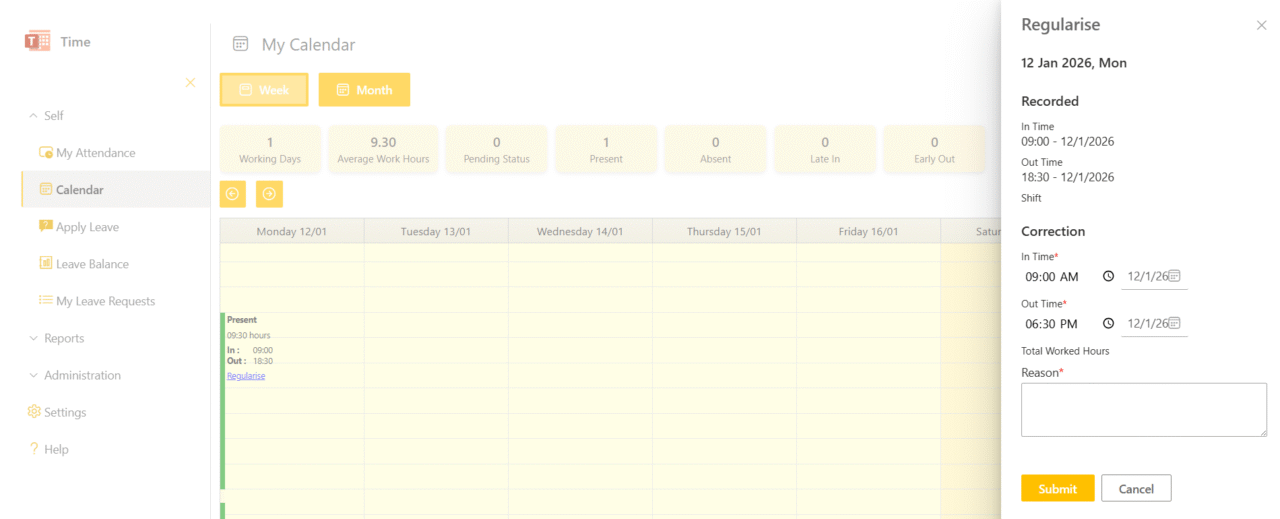
Attendance Regularization – Employees can request corrections for missed or incorrect swipe timings, with manager approval workflows and full audit tracking.
Excel Export (Smart Views) – Export attendance and leave data based on personal view, team view, or complete dataset — optimized for payroll, audits, and reporting needs.
Configurable Leave Policies – Admins can define leave types, manage holidays, configure company policies, edit leave balances, and control application rules without custom development.
Security & Access Control – Rule-based row-level and item-level permission support ensures data integrity, confidentiality, and secure access control.