Projects

Configuration

Permissions

1. Site Owner permissions are required to install and configure the app.

2. The webpart can be accessed by both team/site owners and members.

Steps

1. Navigate to the SharePoint Page

  • Open the SharePoint page where you want to add the web part.

  • Click on the Edit Page option.

2. Add the Web Part

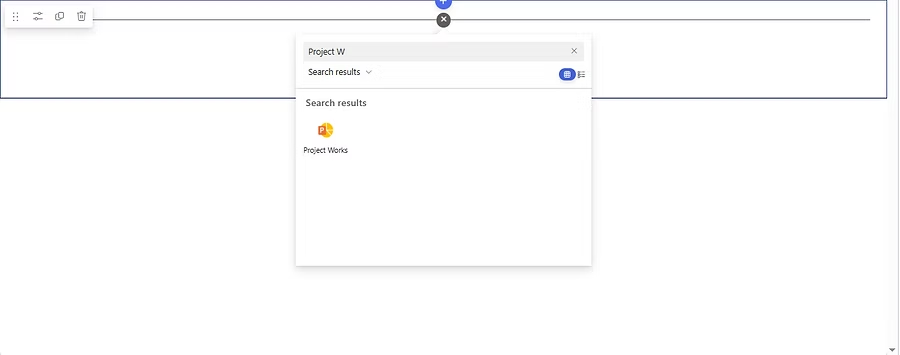
  • Click on the + (Add a Web Part) button.

  • Select the Projects web part and click Add.​​​​​​​​​​​

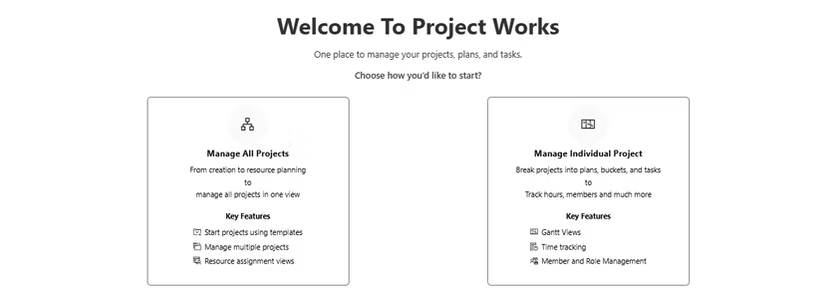
  • Select how you would like to use.

                a. To manage all projects (as a centralized place/site)

                b. To manage individual project (used only for individual project).

  • If Managing all Projects, Data needs to imported first from Import Data.

Ready to Transform Your Business? Take the First Step Today!

Totam rem aperiam, eaque ipsa quae ab illo inventore veritatis et quasi architecto beatae vitae dicta sunt.

Call Us

+62 (385) 5025004

Email Us

contact@domain.com

Quick Link

Services

Resource

Social

Legal

Copyright © 2025 Chandra. All rights reserved.
wpChatIcon
wpChatIcon
Feedback form
Name