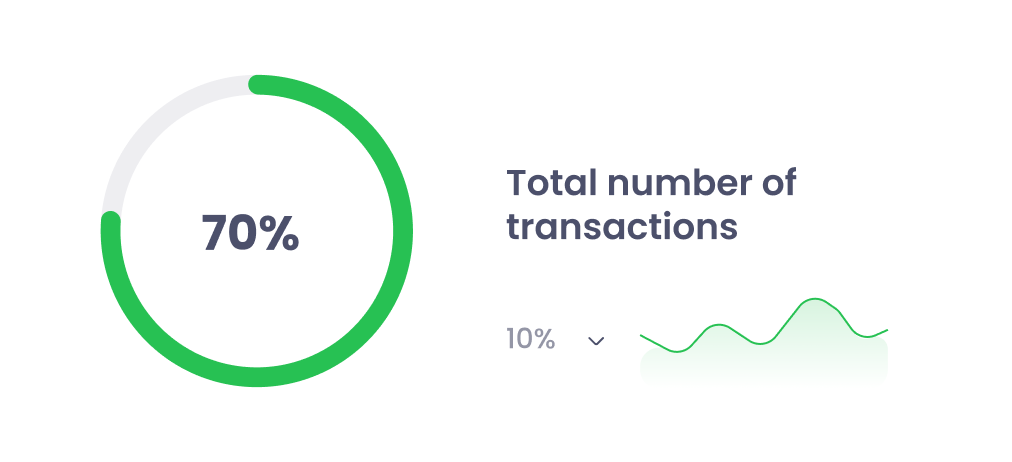
0
%

Expense
Modernize Your Reimbursement Process — Fast, Transparent & Effortless
Expense Works is your all-in-one digital platform for submitting, approving, and processing reimbursement claims—fully integrated into SharePoint and Outlook.
Say goodbye to spreadsheets, manual approvals, and confusing email threads.
From claim submission to final payment, every step is streamlined, tracked, and audit-ready.
Focus on Workflow Efficiency (Best for Operations)
100% Digital
Ditch the paperwork. Automate claim submissions, approvals, and processing—all inside your SharePoint ecosystem
FAST
Faster Approvals, Happier Teams
Role-based workflows, smart validations, and instant notifications ensure claims move quickly with full transparency.
Key App Features
Transform the way your organization manages reimbursements.
Expense Works centralizes every claim, approval, and payment step in one modern, intuitive interface.
Employees can submit claims in minutes; managers and finance teams gain instant visibility through structured data, role-based routing, and real-time reporting.
With Excel exports and flexible configurations, you’ll always have clarity over company spend.
Submit Claims in Just a Few Clicks
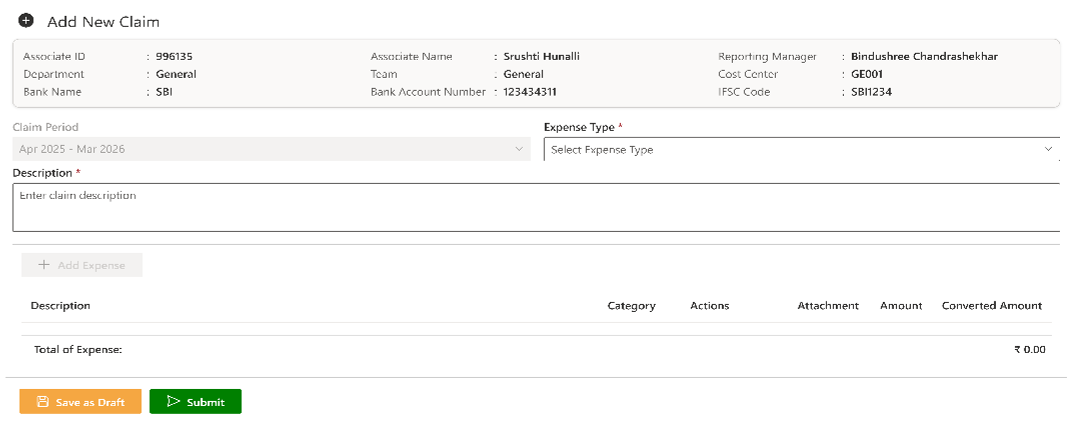
Employees can log expenses quickly by choosing an expense type, adding bill details, and uploading receipts. Smart validation ensures no information is missed, and drafts can be saved for later.
Track Every Claim with Total Clarity
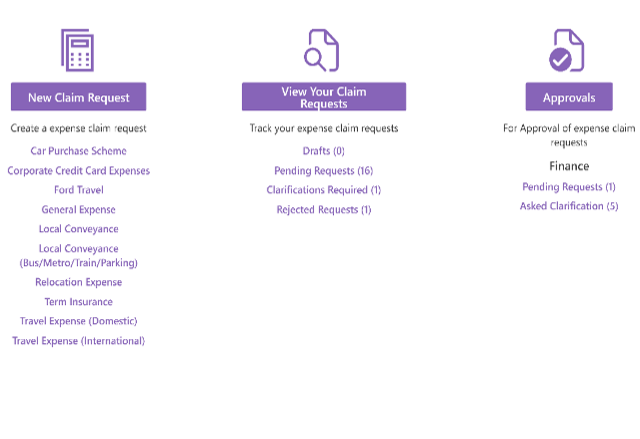
View all your claims—Draft, Pending, Clarification Requested, Rejected, Processed, or All—organized beautifully. Drill into details, view approval history, respond to clarifications, or resubmit with ease.
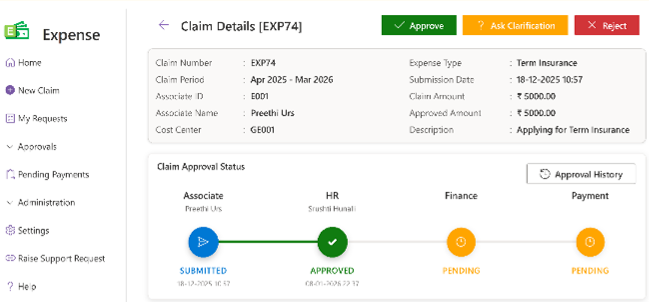
Approve with Confidence
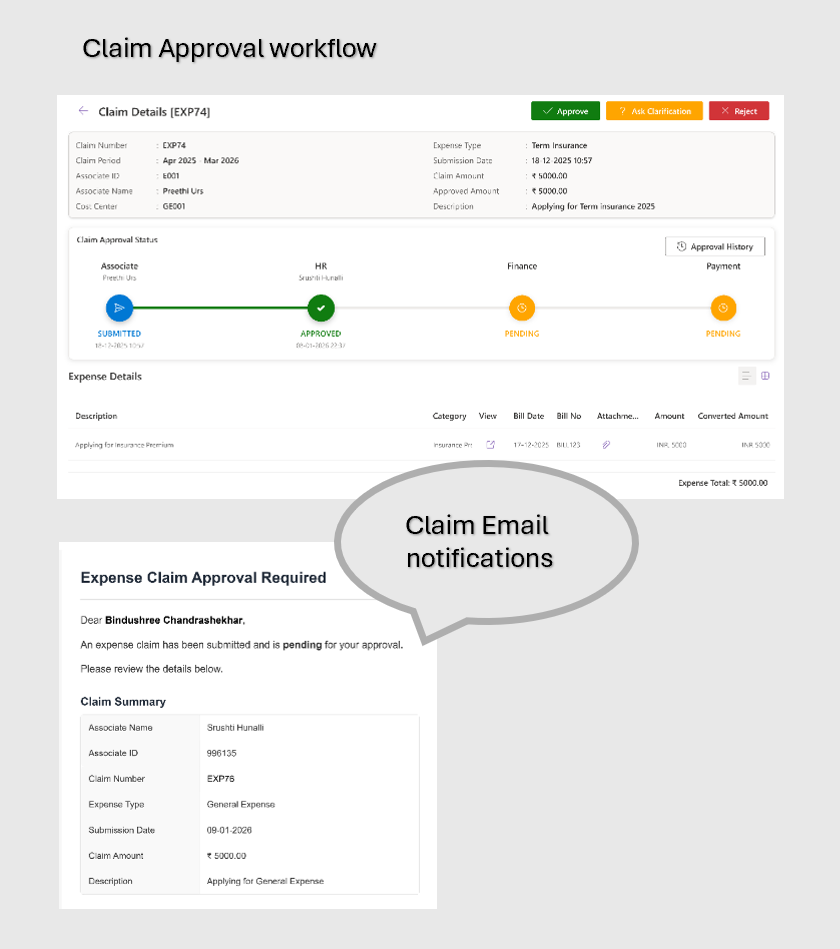
Managers, HR, Finance, and Admin reviewers can examine claims, verify attached bills, and take action: Approve, Reject, or Request Clarification. Every decision is stored in Approval History for future reference.
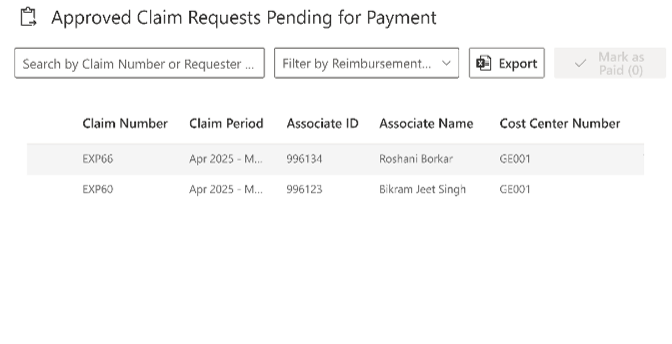
Process Payments Seamlessly
Finance teams can see all claims awaiting payment, filter them by Claim Number/Requester Name/Expense Type, export reports, and mark claims as paid—all in one place.
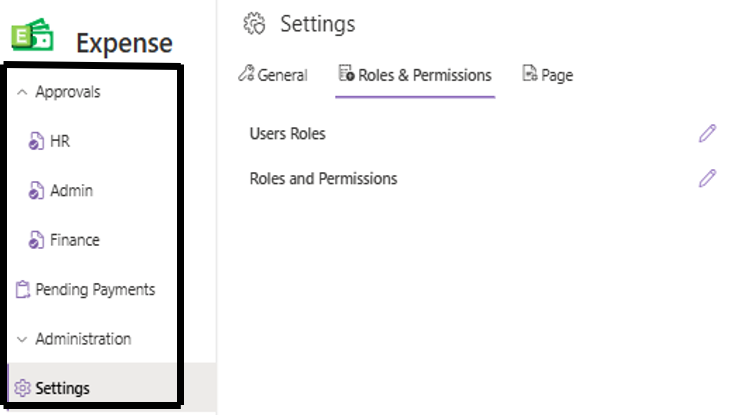
Configure, Control & Launch Expense Works Your Way
Configure, control, and launch with ease. Expense Works lets you manage master data, policies, roles, and approvals through flexible settings—without code. With role-based access and fast SharePoint deployment, your reimbursement process is ready in minutes.
Application Overview
Experience a seamless expense workflow fully integrated into your existing Microsoft 365 environment.
- Home
- New Claim
- My Requests
- Approvals
- Pending Payments
- Administration
- Edit
Your Central Hub for All Expense Activities
The Home screen gives every user a clear starting point. Whether you’re submitting a new claim, reviewing its status, or approving requests, everything begins here. Quick-access buttons guide users to the most relevant features based on their role, ensuring a fast and intuitive experience.
New Claim
Redirects the tab to New Claim where user can start a reimbursement request instantly
Approvals (Role-Based)
Managers, HR, Finance, or Admins can jump straight into pending approvals
My Requests
Track all your submitted claims with full transparency
Role-Aware Navigation
Home adapts based on whether the user is an Associate, Manager, HR, Finance, or Administrator
Submit Reimbursement Claims in Minutes
Create claims quickly using a guided form that captures all essential details — from claim type and bill numbers, GST details, and attachments. Save as draft or submit instantly based on your readiness
Claim Type Selection
General, Travel, Conveyance, etc.
Smart Validation
Required fields ensure accurate submissions
Attach Bills
Upload supporting receipts and documentation
Add Multiple Expense Items
Description, Bill Date, Amount, Bill No., GST IN, Upload PDF or image
Save as Draft / Submit
Flexibility to edit before final submission
Track All Your Claims in One Organized View
Never lose track of your reimbursement journey. View every claim you’ve created — Draft, Pending Approval, Clarification Requested, Rejected, or Processed. Filter and search your data effortlessly, ensuring total clarity from submission to settlement.
Global Search
Instantly search across Claim Number, Period, Type, Amount, and more.
Sortable Columns
Click any column to sort and refine your view.
Clarification Handling
Respond to clarifications and resubmit with ease.
Advanced Filters
Filter by Status, Claim Period, Reimbursement Type, Amount, or Date.
Full Claim Details
View the claim’s approval history, comments, and attached bills.
Review, Approve, and Take Action with Confidence
Approvers (Manager, HR, Admin and Finance) see all claims waiting for their review in one place. Examine line items, verify bills, view comments, and take quick actions — Approve, Reject, or Request Clarification.
Role-Based View
Managers, HR, Finance, and Admin see only what they need to review.
Action Controls
Approve, Reject, or Request Clarification.
Audit Logging
Every decision is recorded for compliance.
Detailed Review Panel
Review expense details, attachments, and the approval history.
Search & Sort
Find claims by type, employee, amount, or date.
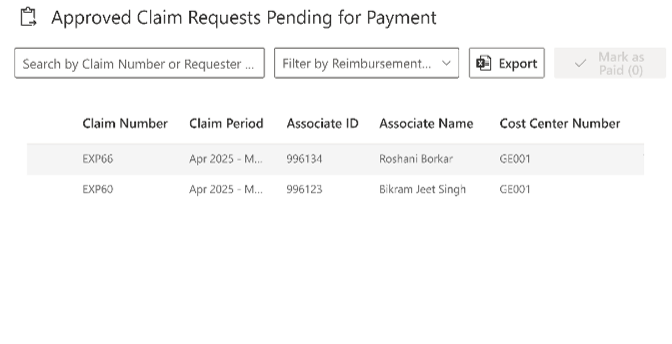
Finalize and Record Payments Seamlessly
- Once approved, claims move to the Finance team for payment processing. Filter, export, and mark claims as paid — ensuring a smooth end-to-end reimbursement cycle.
Finance-Only Access
Restricted to finance roles.
Excel Export
Generate payment processing reports instantly.
Full Visibility
View amount, claim type, employee, and approval data.
Advanced Filters
Search by Claim Number, Employee ID, Claim Type.
Mark as Paid
Update claim status once completed.
Manage Your Entire Expense Ecosystem from One Place
The Administration module serves as the central control hub for Expense Works. From organizational structure and financial mappings to approval workflows and communication templates, administrators can manage all master data and system configurations through a unified, panel-based interface—ensuring accuracy, consistency, and policy compliance across the entire reimbursement lifecycle.
Organization & Structure
- Locations: Add and maintain workspace locations to support region-based workflows.
- Departments: Manage department records linked to associates, approvals, and reporting.
- Teams: Define team structures that integrate directly with associates and workflows.
- Associates: Maintain employee profiles, map departments, teams, and roles, and manage role assignments.
Financial & Project Mapping
- Cost Centers: Define and manage financial allocation points used in reimbursement processing.
- Projects: Create and maintain projects that can be selected during claim creation or editing.
Expense Configuration
- Categories: Organize expense categories for consistent classification and reporting.
- Merchants: Maintain vendor and merchant information for accurate data entry and audits.
- Expense Types: Define and customize reimbursable expense types to match company policies.
Workflow & Communication
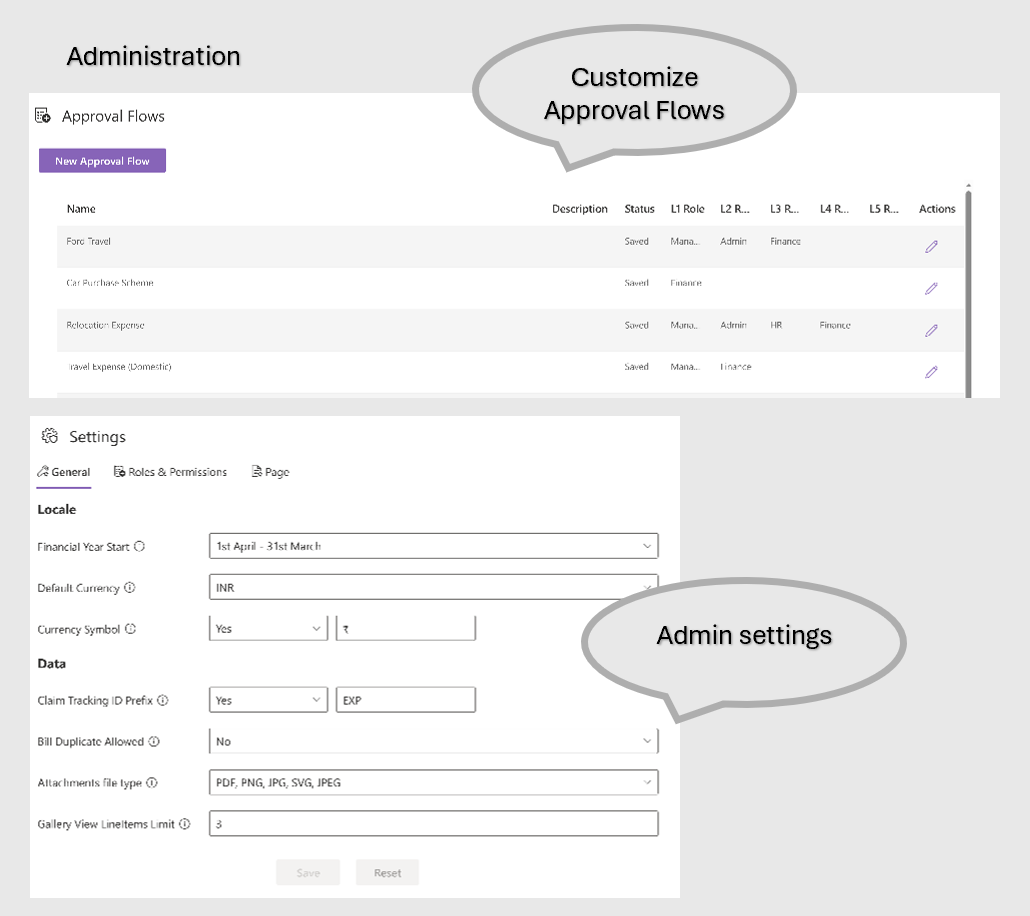
- Approval Flows: Build flexible, multi-level approval workflows involving Managers, HR, Finance, and Admin roles.
- Email Templates: Edit automated notification emails used throughout the claim lifecycle for clear, consistent communication.
System Settings & Controls
- General Settings: Configure claim periods, financial year start, default currency, allowed attachment formats, and claim ID prefixes.
- Roles & Permissions: Assign HR, Finance, Manager, and Admin privileges to control access and responsibilities.
- Page / UI Controls: Show or hide SharePoint elements such as O365 navigation, hub navigation, comments, and page titles.
- Save or Reset: Apply changes instantly or revert to previously saved configurations with a single click.
Unified administration experience with side-panel editing
Add, edit, search, and manage records effortlessly
Clean, structured data stored securely in SharePoint
Designed for scalability, governance, and audit readiness
Add Custom Links and Labels — Just Like SharePoint Navigation.
Give your Expense Works app a personalized touch. Site Owners can add custom navigation links or labels to guide users to policies, HR portals, travel guidelines, or other internal resources.
Add custom navigation links
Drag and reorder for perfect structure
Restricted to Site Owners for governance
Add non-clickable labels to group links
Edit or delete items anytime
Configure Your Expense Workflow Your Way
100% native to SharePoint, Expense Works gives you complete control over how your reimbursement process operates.
Use the Admin Settings panel to configure financial year settings, claim period rules, default currency, attachment policies, and role permissions—all without writing a single line of code.
From managing approval flows and organizational master data to bulk-updating categories, merchants, and expense types, Expense Works adapts effortlessly to your policies, structure, and workflow.
Plans That Fit Your Scale
Lorem ipsum dolor sit amet, consectetur adipiscing elit, sed do eiusmod tempor incididunt ut labore et dolore magna aliqua. Ut enim ad minim veniam
- Monthly
- Yearly
Basic Plan
Get the basic HR support you need keep your small business running smoothly
$0/per month
- Basic reports
- 24/7 email and live chat support
- Active fraud prevention
- Dispute management
- 2 staff accounts
Best Value
Premium Plan
Get the basic HR support you need keep your small business running smoothly
$68/per month
- Professional reports
- 24/7 email and live chat support
- Active fraud prevention
- Dispute management
- 5 staff accounts
Enterprise Plan
Get the basic HR support you need keep your small business running smoothly
$125/per month
- Custom report builder
- 24/7 email and live chat support
- Active fraud prevention
- Dispute management
- 15 staff accounts
Basic Plan
Get the basic HR support you need keep your small business running smoothly
$80/per yearly
- Basic reports
- 24/7 email and live chat support
- Active fraud prevention
- Dispute management
- 2 staff accounts
Best Value
Premium Plan
Get the basic HR support you need keep your small business running smoothly
$112/per yearly
- Professional reports
- 24/7 email and live chat support
- Active fraud prevention
- Dispute management
- 5 staff accounts
Enterprise Plan
Get the basic HR support you need keep your small business running smoothly
$185/per yearly
- Custom report builder
- 24/7 email and live chat support
- Active fraud prevention
- Dispute management
- 15 staff accounts
Ready to Transform Your Business? Take the First Step Today!
Purpose-built tools for real-world engineering
Call Us
+49 821 71717
Email Us
support@chandra.works

Copyright © 2025 Chandra. All rights reserved.